Website indexing: Why is it essential for SEO?
1. What is website indexing, and why is it crucial?
When you create a website, one of the most critical aspects of a successful SEO strategy is the’indexing. But what does this term actually mean? Simply put, indexing is the process by which Google and other search engines «store» your website’s pages in their databases. This allows these search engines to display your site when a user performs a search related to your content.
If your site isn't properly indexed, you may never appear in search results—and therefore won't generate organic traffic—a problem you might encounter if your The site doesn't show up on Google. For a business or an online store, this can have a significant impact on visibility and sales. That is why understanding how this process works and how to optimize it is essential.
2. How does Google index a website?
Google uses web crawlers, often called «crawlers» or «spiders,» to crawl the pages of your site. These robots follow internal and external links to discover new pages to add to the index. Once a page is discovered, the search engine analyzes it, extracts its content, and adds it to its index so that it can be retrieved when users perform searches.
It is important to note that indexing does not necessarily mean that all your pages will appear immediately in search results, such as if your site is in the Google Sandbox. Some pages may be indexed but not appear in search results due to their content, quality, or relevance to search queries.
3. The criteria Google uses to index a website
Google considers several factors when deciding how to index and rank your pages. Here are some of the most important ones:
- Unique and relevant content : Google prioritizes pages with original, well-structured content that is relevant to users' search queries. Pages that are duplicated or of poor quality may be ignored.
- Site Structure : A well-designed site structure that’s easy for robots to crawl is crucial. The better organized your site is, the easier it will be to index.
- Website speed : Pages that take a long time to load may be ignored or penalized by Google, as this negatively impacts the user experience.
- Mobile compatibility : Google prioritizes mobile-optimized websites. If your website isn’t responsive, you may not be indexed properly, especially with mobile-first indexing.
- High-quality backlinks : Having backlinks from reputable sites can boost your credibility in Google’s eyes and speed up indexing.
4. How can you check if your site is indexed?
There are several simple ways to check whether your site has been indexed. The quickest method is to perform a Google search using the following syntax: site:votresite.com. This search will show you all the pages on your site that are currently indexed by Google. If you only get a few results, it may indicate that there is a problem with the indexing of certain pages.
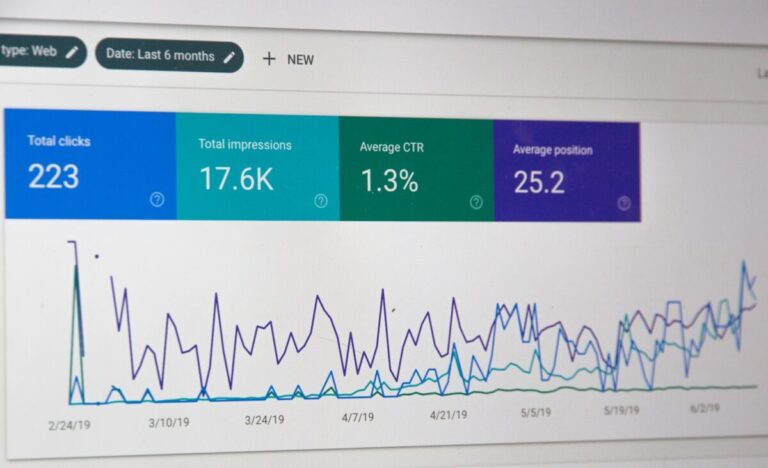
You can also use Google Search Console to get a detailed overview of your site’s indexing. This free tool lets you see crawl errors, unindexed pages, and even pages that have been removed from the index.
5. How can you speed up the indexing of your website?
Indexing can sometimes take a while, especially for larger or newer websites. However, here are a few tips to speed it up:
- Submit a sitemap file : An XML sitemap file lets Google know where all the important pages on your site are located. We strongly recommend submitting this file via Google Search Console.
- Request manual indexing : If you have a new page or important content, you can ask Google to index it more quickly through Google Search Console.
- Update the content regularly : Google favors websites that publish fresh, regularly updated content. This encourages crawlers to return more often and index new pages more quickly.
- Improve loading speed : The faster a website is, the more likely it is to be indexed properly. A fast website provides a better user experience and is crawled more effectively by Google.
6. Common mistakes to avoid to ensure proper indexing
There are several common mistakes that can hinder your site’s indexing; here are the most frequent ones:
- Duplicate pages : Pages with very similar or duplicate content may be penalized by Google. Be sure to set up proper redirects and use tags canonical to indicate the main version.
- 404 errors and broken links : When web crawlers encounter pages that no longer exist or have broken links, it can affect indexing and the user experience. Use tools like Screaming Frog to detect these errors.
- Pages blocked by robots.txt : Make sure you aren't accidentally blocking crawlers from accessing important pages via your robots.txt file—a problem that can occur if a page is indexed despite the robots.txt file being blocked.
- Pages marked as «noindex» : Sometimes, by mistake, you may include the «noindex» tag on pages that you want to be indexed. Be sure to configure these tags correctly in your CMS.
7. Indexing E-commerce Sites: Some Key Considerations
For e-commerce sites, indexing can be a bit more complex due to the large number of product pages, filters, and variants. Here are a few tips to avoid indexing issues specific to e-commerce sites:
- Product Page Management : Make sure each product has its own unique, well-optimized page. Avoid duplicate pages with similar product variants.
- Filters and sorting : If your site offers search filters or sorting options, make sure these pages aren't indexed twice by using directives noindex.
- Dynamic URLs : Avoid excessive use of dynamic URLs, which can result in duplicate pages or pages that are difficult to index.
8. Tools for monitoring and improving your site’s indexing
To monitor your site's indexing, there are several tools available to you:
- Google Search Console : This essential tool for any website lets you monitor indexing status, identify errors, and submit pages.
- Screaming Frog SEO Spider : This software allows you to simulate a crawl of your site and detect indexing errors, broken pages, and other technical issues.
- SEMrush / Ahrefs : These tools are particularly useful for monitoring your website’s overall performance in terms of indexing and backlinks.
Personalized, no-obligation analysis, response within 24/48 hours with 3-5 concrete quick wins.
150 entrepreneurs have already put their trust in us
🔒 Your data is never shared with third parties
